Thread Pools
If your code runs in more than one thread, you have to learn which code has to run on which thread. Navigating this landscape can be tricky, so let's build an understanding for the tower of abstraction we've built over the years.
Hardware
The very foundation of our tower of abstraction is the hardware that runs our code. You probably have seen a picture like this before.
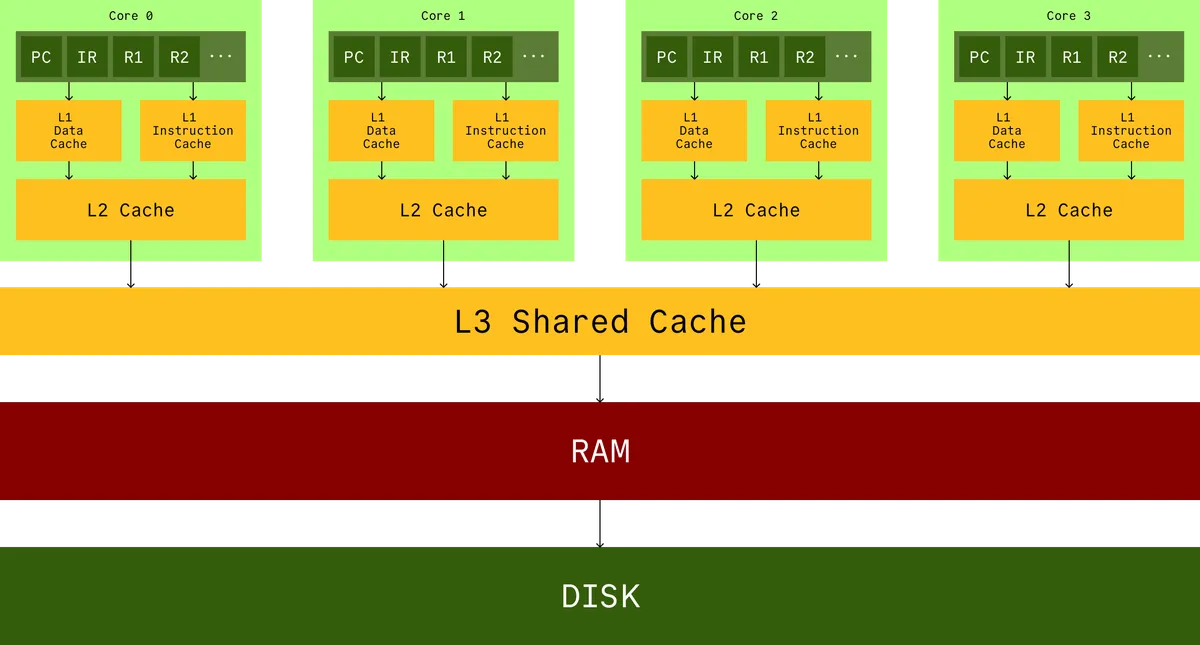
This is a cartoon. It looks nice, but it obfuscates how far apart the RAM really is from your cores. Your cache is on the same die as your CPU, around apart, and the RAM can be like away. In terms of latency, RAM is something like times slower than cache.
If you wanna do anything useful, operate on data, or read instructions, you have to bring the data into the registers and have to bring them all the way from RAM through all the layers of cache. The hardware engineers made an assumption about the way you write programs. If you read some byte at offset , you will very likely read and and so on afterward (this is called spatial locality). If you violate this assumption you will negate decades of optimizations.
CPUs execute instructions and track their position using a Program Counter (PC). Instructions can populate data into registers (through the caches) from RAM and read it. They can write new data into those registers as well. There can also be interrupts that preempt the next instructions. For example timers or I/O devices.
Kernel
The first layer of abstraction you build on top of hardware, is the kernel. The kernel gives you a data structure that keeps track of all the values in the registers of a CPU, when some code was running on it. Let's call this abstraction a thread.
This is a simplification, a thread is more than just a snapshot of register values (it has a unique identifier, thread local storage, details about ongoing syscalls, stack space, memory mappings, file descriptor states, and more), but let us for now imagine that when a thread is active, it represents the values currently on the registers, and when it is inactive, that state can be stored in some memory somewhere.
So for every core, there is a queue of threads called the runqueue. The kernel schedules these threads to do some work on that core, and whenever a core is idle it will work-steal from the queue of other cores.
Threads go through various states: created, ready, running, waiting (e.g., on I/O or timers), or terminated. Only one thread per core is running at a time; others sit in queues managed by the scheduler.
The (preemptive) scheduler works by checking if the current thread has spent its fair share of time on the CPU. If so, it will select the next highest priority thread from a priority queue of this core. If that thread is ready, then it will context switch that thread in. This process is basically bundling all the current values in the registers and putting it back into the priority queue at the lowest weight (not quite, the priority queue is actually using something like ), and then copying in all the register values of the new thread. If the thread is not ready, and you move on to the next thread.
There are several reasons that you would NOT want to have many threads in your application.
Context switching threads is actually a pretty expensive operation. Copying all the registers is expensive and that's not even the entire work that has to be done. With enough threads, you'll end up spending more time context switching than doing useful work.
The modern CPU also does a lot of wacky things, like pipelining and speculative execution. You suddenly moving your program counter somewhere else defeats all the hardware-level optimizations that are there to speed up your application. Remember the hardware assumption for cache locality? If you access position you will likely also access ? With many threads, it is unlikely they will be accessing similar parts of your memory so you will also incur expensive cache misses.
On top of all of this, in garbage-collected languages, threads are actually GC roots (they are starting points for the GC algorithm to discover all the reachable objects and free unused ones to release memory). So, having more threads will increase your garbage collection times.
The combination of reasons mentioned, and many more, is the reason why you should aim to have fewer threads in your application. Threads are heavyweight. Even waiting threads are costly. However, you cannot avoid waiting. Doing IO means you will eventually have to do waiting somewhere. This problem is the reason people came up with async IO.
Async IO
What if instead of having every thread that does IO wait on its IO, you sacrificed one (or a small number of) threads to do all the waiting, on behalf of all the other threads? All the other threads can do CPU bound compute work in the meantime.
Depending on the operating system, there are different system calls to do this class of work. BSD and macOS use kqueue while Linux uses epoll. Let's look at how epoll works.
When a process wants to monitor multiple file descriptors (which could be sockets, pipes, or other I/O channels), it first creates an epoll instance through the epoll_create system call. This creates a special file descriptor that represents the epoll instance. You can modify this with epoll_ctl to add/remove file descriptors you want to monitor or signal your interest in specific events (readable, writable, errors). Later, you can ask for a list of events with epoll_wait later with a specified timeout, where you will essentially block until events are available for you.
So the idea would be, have one dedicated async IO thread. In that thread create an epoll. Whenever any other threads needs to do IO, instead register the corresponding file descriptor to this epoll, and a callback for handling the result. In the dedicated async IO thread, sit in an infinite loop and block until any events are available. When events are available, dispatch the work back to the threads that are doing the work so they can continue.
while true do
  val events = epoll.wait(maxEvents, timeout)
  events foreach { event => pool.execute(continuations(event)) }
This idea is at the heart of things like Java's NIO, ScheduledExecutorService or Netty.
To recap, the kinds of work you do fall into 3 categories:
CPU-bound
A CPU-bound task is one that is computational in nature. This kind of work spends the majority of its time actively executing CPU instructions and their execution time is a function of the clock speed of the CPU. So think, doing math, encryption, hashing, encoding/decoding, compression, and alike. A task like this will keep one of your CPU cores busy at 100% utilization. For this very reason, it makes no sense for you to run more of these tasks than there are cores on your machine (There are specific CPU architectures that support Simultaneous multithreading which can allow a single CPU core to execute 2 independent instruction streams simultaneously, such as Intel's hyperthreading. In these cases, for specific kinds of work you can benefit from running twice as many tasks as you have cores). For these kinds of tasks, you should use a bounded thread pool. These kinds of pools are usually a fixed number of workers that take tasks from a shared queue of tasks.
Blocking IO
In our fixed-size thread-pool mentioned above, a thread is a very precious resource. You want to avoid any tasks that are not actively using the CPU, as in, any task that can cause a thread to enter a waiting state while requesting data from a slower subsystem, like disk, network sockets, databases, etc. This is called blocking IO. In general, if you have a piece of code that can introduce blocking IO into your compute pool, eventually, there will be a time when all of your CPU cores are just chilling and doing nothing. You want to avoid blocking on your compute pool at all costs. You would usually want this kind of work to be sent over to an entirely different thread to keep it away from your compute pool. And isolate these tasks to tiny scopes. For this kind of work, a seemingly good choice is a cached unbounded thread pool. This kind of pool creates a new thread to do the work and then caches this thread to be reused by next tasks for a while. It sounds pretty convenient for this kind of work but at the same time this is incredibly dangerous. Every new task will essentially hold a thread hostage. Imagine a case where you start thousands of new tasks simultaneously. This kind of unbounded pool will create many new threads and in turn it will:
- Exhaust your systems resources (remember that threads are extremely expensive)
- Cause thrashing due to many new context switches introduced
- Can OOM your application
So, if you decide to use this kind of unbounded cached pool in your application, you have to put application-level external constraints on it. Making sure you do not exceed the resources allocated to your application. You can achieve this with a non-blocking bounded queue and backpressure. But this will mean that you will have to think about the design of your application carefully to be able to backpressure the sources that introduce this kind of work into your system. You can even reuse this kind of queue for kinds of blocking that are not necessarily IO blocking, but just a specific thread that you do not want sitting in your compute pool, preventing other work from executing.
Non-blocking IO polling
This is your epoll/kqueue/timer threads. How you usually end up using this API is you have one (or a small number close to one) dedicated thread that sits and does all the blocking and once events are available, dedicated work associated with that notification (often times a callback invocation) is then submitted to the compute pool. Note that you absolutely do not want do any actual work on this thread. You can guess why, since these threads are the beating heart of your application, any time you spend doing anything but asking for more events is time that comes out of your latency budget. This is also why this thread should be given the highest priority when being scheduled.
Modern effect systems like Cats Effect and Tokio also utilize the same ideas, and honestly you should absolutely use them instead of trying to do this yourself or using what comes prepackaged for you in things like the ForkJoin pool.